When commissioning or building a museum website, the development team will make decisions about the design, code and content that can have a significant impact on disabled people, both during their visit to the website and in relation to their visit to the museum itself.
Below are 10 guidelines to help you develop an accessible museum website. While many of these will be specifically important for users who are autistic, blind or partially sighted, D/deaf and hard of hearing, have motor disabilities or dyslexia, they also form the basis of good universal design – improving accessibility for all.
There are also 10 guidelines for ensuring that the access information provided is welcoming and informative for disabled visitors. For more detail, and links to resources and examples of best practice through the UK, see the
State of Museum Access 2018, published by VocalEyes, Stagetext and Autism in Museums in September.
Accessible website design
Use well-structured HTML5. Screen reader users rely on good coding to navigate your site.Text should be in a readable font, style and size, and have high contrast with its solid background; don't place text on an image or pattern. Use plain English, in simple sentences.Describe and transcribe non-text content (images, videos, and audio). On a museum website in particular, it's not only the alt-text that you should consider (which should describe an image for those unable to see it, for use by screen-reading software). Also use descriptive language about the venue and collections in image captions, headings and body text.On video, set subtitles to show by default. This is better for mobile users and people who aren't familiar with player controls.Use a simple and consistent layout that works at 200% zoom, without horizontal scrolling.Ensure text used for headings, links and buttons is descriptive and concise.Ensure the site is navigable using only a keyboard.Let users change background and text colours.Test your website with a range of users, including people with a range of access requirements.
Museum website access information
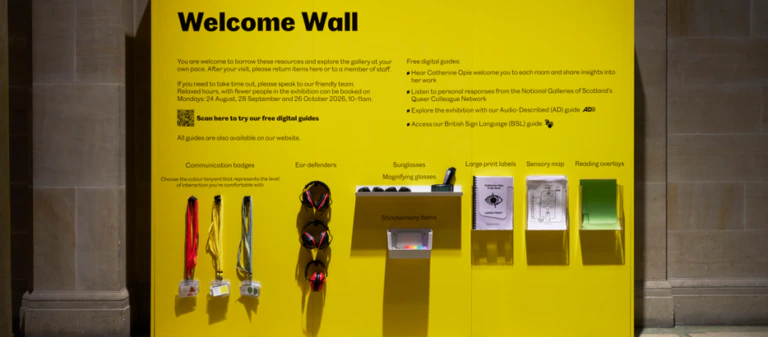
Be generous: provide lots of details, for example, about getting to your venue by car or public transport.Be direct: disability affects around one in five of your visitors. Address the information to people in an inclusive manner: don't refer to disabled visitors in the third person or restrict access information to a policy statement.Be honest: your museum may have some areas that present barriers to access. Be upfront and open about this and describe them so that a visitor can decide for themselves whether they can access them or not. Don't make assumptions for people about what is or isn't accessible.Use a range of media (images, video and audio) as well as descriptive text. Visual media is very useful as part of the visit planning process.Provide contact information for people who have further access enquiries – but not just a telephone number, which is not helpful for a D/deaf person.Inform visitors if front-of-house staff have had awareness or other relevant training, and how to identify them – for example, badges indicating BSL-trained staff.Consider the museum as a multi-sensory space: describe the noises, smells, lighting, surfaces and atmosphere that might impact autistic visitors or visitors who are blind or partially sighted, or D/deaf or hard of hearing.Provide downloadable resources that visitors can use in the museum or on the journey to it: descriptive directions, Easy Read guides, Visual Stories, sensory maps, for example, are all useful.Describe and direct people to resources and services within the museum, such as audio-descriptions, braille or large print guides, hearing loops, seating and wheelchair loans.Consult disabled people about your access information. Set up an access panel or approach a local group.
Matthew Cock is the chief executive of arts and heritage accessibility charity VocalEyes The Museums Association is holding a one-day conference on digital basics at the Museum of Science and Industry, Manchester, on 29 January.
It will cover practical approaches to social media; using analytics to run effective digital marketing strategies; identifying, planning and commissioning effective web content; and a digital surgery, where specific questions from delegates will be answered by experts including Chris Unitt of One Further.